> ## Documentation Index
> Fetch the complete documentation index at: https://docs.stablepayfi.ai/llms.txt
> Use this file to discover all available pages before exploring further.
# 集成前准备
> 集成 StablePay API 前需要了解的基础信息:API Key 获取、请求签名、Webhook 通知与安全建议。
本文档介绍集成 StablePay API 前需要完成的准备工作,包括账号与密钥获取、请求签名算法、Webhook 事件通知机制,以及每个接口需要携带的请求头。
## 基础信息
| 项目 | 值 |
| ------------- | -------------------------- |
| 生产环境 Base URL | `https://api.stablepay.co` |
| API 前缀 | `/api/v1` |
| 协议 | HTTPS |
| 数据格式 | JSON |
| 字符编码 | UTF-8 |
## 前置条件
开始接入前,请确认你已经:
1. 注册 StablePay 商户账号并完成资质审核
2. 在商户后台创建店铺,渠道类型选择 **API**,等待审核通过
3. 在店铺的「密钥管理」菜单中生成并获取:
* **API Key**:用于 `Authorization` 请求头,标识调用方身份
* **Secret Key**:用于生成请求签名,**请妥善保管,切勿提交到公开代码仓库或分享给他人**
## 创建 API 店铺
如果你的团队准备通过 StablePay API 接入,请先前往 [店铺和开发者](https://merchant.stablepay.co/#/merchant/stores) 页面。
### 第一步:创建 API 店铺
1. 打开 [店铺和开发者](https://merchant.stablepay.co/#/merchant/stores) 页面。
2. 点击【创建店铺】。
3. 渠道类型选择 **API**。
4. 按实际业务信息填写店铺名称和域名。
5. 提交创建申请,并等待 StablePay 运营团队审核。
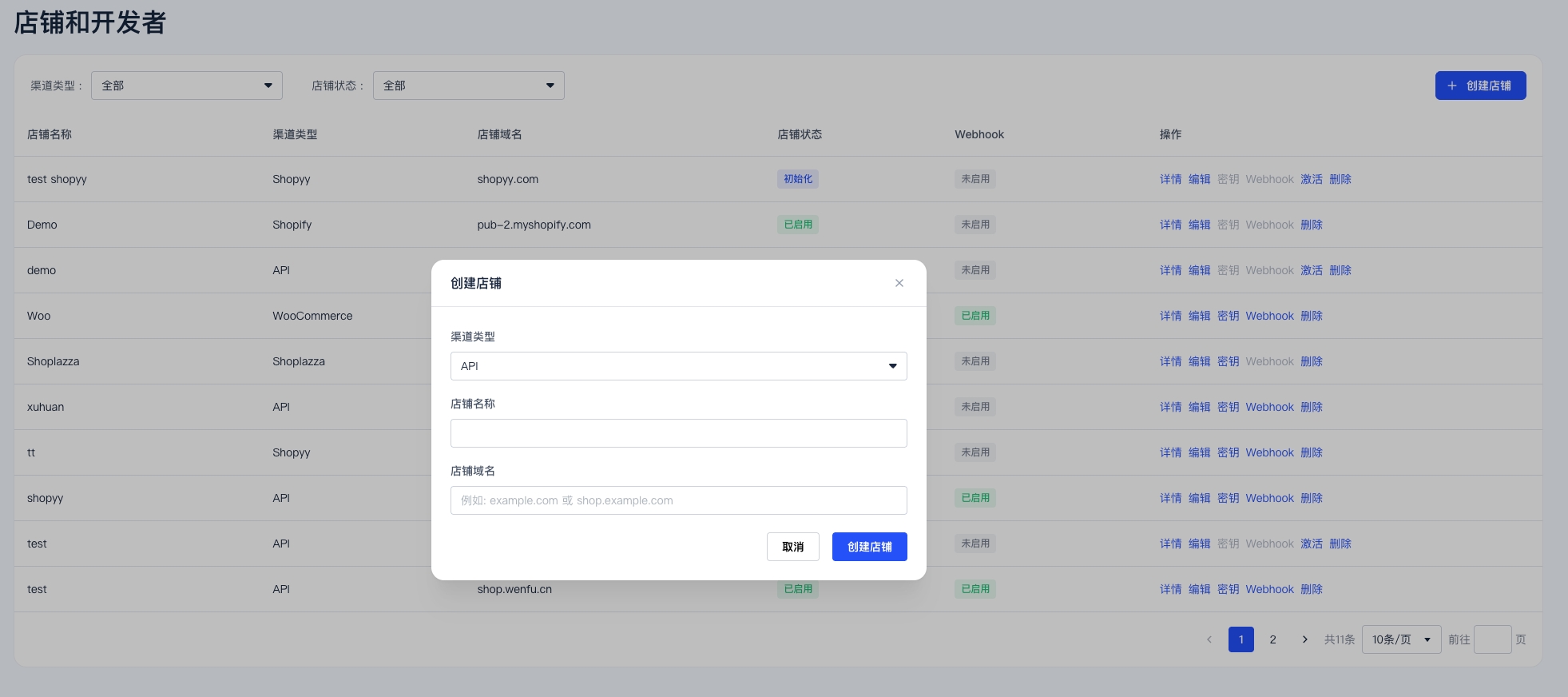
API 凭证和 Webhook 设置都是按店铺维度创建和管理的。请先确认你创建的是正确的店铺,再等待店铺审核通过并启用。
### 第二步:等待店铺启用
审核完成后,店铺状态会显示为【已启用】。只有在店铺启用后,才可以在该店铺的操作菜单中进入【密钥】和【Webhook】配置。
## 创建 API Key 和 Secret Key
当店铺状态显示为【已启用】后:
1. 返回 [店铺和开发者](https://merchant.stablepay.co/#/merchant/stores) 页面。
2. 打开对应店铺的操作菜单。
3. 点击【密钥】。
4. 创建 **API Key** 和 **Secret Key**。
5. 如果有效期设置为 `0天`,表示该密钥长期有效。
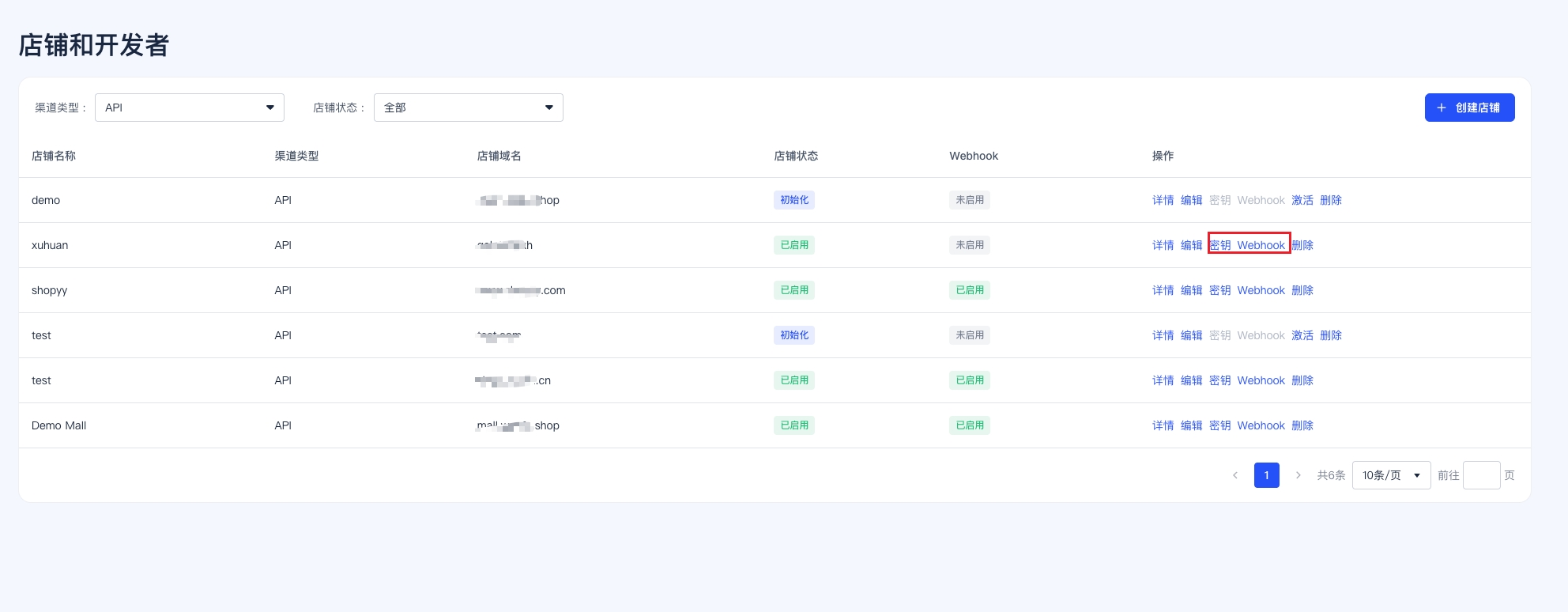
Secret Key 创建后请及时复制并安全保存。不要将其暴露在前端代码、浏览器存储、截图、公开仓库或群聊中。
## 认证与签名
### 请求头清单
所有 API 请求都必须携带以下请求头:
| 请求头 | 是否必填 | 说明 |
| ----------------------- | ----------- | ------------------------------------------------- |
| `Authorization` | 是 | 格式:`Bearer {api_key}` |
| `Content-Type` | POST/PUT 必填 | 固定为 `application/json`。GET 请求不必携带 |
| `X-StablePay-Timestamp` | 是 | Unix 时间戳(秒),与服务器时间相差不得超过 **5 分钟** |
| `X-StablePay-Nonce` | 是 | 随机字符串(**16\~64 字符**,建议 UUID v4),用于防重放,每次请求必须唯一 |
| `X-StablePay-Signature` | 是 | 使用 Secret Key 对签名串做 HMAC-SHA256 运算后的**小写十六进制**字符串 |
### 签名串拼接规则
```
sign_payload = {timestamp} + "." + {nonce} + "." + {requestBody}
```
* `{requestBody}`:POST / PUT 请求为**原始 JSON 字符串**(不要再次序列化、不要格式化)
* GET / DELETE 等没有请求体的方法:`{requestBody}` 取**空字符串**
* 签名算法:`HMAC-SHA256(sign_payload, secret_key)` → 小写 hex 字符串
### 示例代码
```bash cURL theme={"system"}
TIMESTAMP=$(date +%s)
NONCE=$(uuidgen)
BODY='{"amount":1999,"currency":"USD"}'
SIGN_PAYLOAD="${TIMESTAMP}.${NONCE}.${BODY}"
SIGNATURE=$(echo -n "${SIGN_PAYLOAD}" | openssl dgst -sha256 -hmac "${SECRET_KEY}" | awk '{print $2}')
curl -X POST https://api.stablepay.co/api/v1/checkout/sessions/create \
-H "Authorization: Bearer ${API_KEY}" \
-H "X-StablePay-Timestamp: ${TIMESTAMP}" \
-H "X-StablePay-Nonce: ${NONCE}" \
-H "X-StablePay-Signature: ${SIGNATURE}" \
-H "Content-Type: application/json" \
-d "${BODY}"
```
```python Python theme={"system"}
import hmac, hashlib, json, time, uuid, requests
API_KEY = "sk_live_xxx"
SECRET_KEY = "your_secret_key"
body = {"amount": 1999, "currency": "USD"}
body_str = json.dumps(body, separators=(",", ":")) # 紧凑 JSON
timestamp = str(int(time.time()))
nonce = str(uuid.uuid4())
sign_payload = f"{timestamp}.{nonce}.{body_str}"
signature = hmac.new(
SECRET_KEY.encode(),
sign_payload.encode(),
hashlib.sha256,
).hexdigest()
resp = requests.post(
"https://api.stablepay.co/api/v1/checkout/sessions/create",
headers={
"Authorization": f"Bearer {API_KEY}",
"X-StablePay-Timestamp": timestamp,
"X-StablePay-Nonce": nonce,
"X-StablePay-Signature": signature,
"Content-Type": "application/json",
},
data=body_str,
)
print(resp.status_code, resp.json())
```
```javascript Node.js theme={"system"}
import crypto from "crypto";
import { randomUUID } from "crypto";
const API_KEY = "sk_live_xxx";
const SECRET_KEY = "your_secret_key";
const body = { amount: 1999, currency: "USD" };
const bodyStr = JSON.stringify(body);
const timestamp = Math.floor(Date.now() / 1000).toString();
const nonce = randomUUID();
const signPayload = `${timestamp}.${nonce}.${bodyStr}`;
const signature = crypto
.createHmac("sha256", SECRET_KEY)
.update(signPayload)
.digest("hex");
const resp = await fetch(
"https://api.stablepay.co/api/v1/checkout/sessions/create",
{
method: "POST",
headers: {
Authorization: `Bearer ${API_KEY}`,
"X-StablePay-Timestamp": timestamp,
"X-StablePay-Nonce": nonce,
"X-StablePay-Signature": signature,
"Content-Type": "application/json",
},
body: bodyStr,
},
);
console.log(resp.status, await resp.json());
```
签名串中的 `requestBody` **必须**是实际发送的原始字节。不要在计算签名后再对 JSON 进行格式化或重排字段,否则签名会校验失败。
## 每个接口所需的请求头
| 接口分类 | 路径示例 | Authorization | 签名三件套 |
| ---- | ----------------------------------------------------- | ------------- | ----------- |
| 支付 | `POST /api/v1/checkout/sessions/create` | ✅ | ✅ |
| 支付 | `GET /api/v1/checkout/sessions/{session_id}` | ✅ | ✅(body 为空串) |
| 支付 | `POST /api/v1/checkout/sessions/{session_id}/cancel` | ✅ | ✅ |
| 退款 | `POST /api/v1/refunds/create` | ✅ | ✅ |
| 退款 | `GET /api/v1/refunds/{refund_id}` | ✅ | ✅(body 为空串) |
| 退款 | `POST /api/v1/refunds/{refund_id}/cancel` | ✅ | ✅ |
| 订阅 | `POST /api/v1/subscriptions/create` | ✅ | ✅ |
| 订阅 | `GET /api/v1/subscriptions/{subscription_id}` | ✅ | ✅(body 为空串) |
| 订阅 | `GET /api/v1/subscriptions` | ✅ | ✅(body 为空串) |
| 订阅 | `POST /api/v1/subscriptions/{subscription_id}/cancel` | ✅ | ✅ |
| 发票 | `GET /api/v1/invoices/{invoice_id}` | ✅ | ✅(body 为空串) |
| 发票 | `GET /api/v1/invoices` | ✅ | ✅(body 为空串) |
| 支付查询 | `GET /api/v1/payment/{payment_id}` | ✅ | ✅(body 为空串) |
| 支付方式 | `GET /api/v1/payment_method/{payment_method_id}` | ✅ | ✅(body 为空串) |
> `POST /api/v1/subscriptions/create` 还必须额外携带 `Idempotency-Key` 请求头。使用相同键重试时,服务端会返回首次创建的订阅对象。
## 幂等性
以下接口支持幂等,商户自定义 ID 作为幂等键:
| 接口 | 幂等键 |
| ---- | --------------------- |
| 创建退款 | 请求体 `refund_id` |
| 创建订阅 | 请求头 `Idempotency-Key` |
使用相同幂等键重复提交时,服务端返回首次创建的资源,不会产生重复数据。
## Webhook 通知
StablePay 通过 Webhook 将关键事件异步推送到你在商户后台配置的回调 URL。
> 如果你需要查看事件样例、风控冻结状态说明,以及 `payment.failed` 中 `status = "frozen"` 的处理建议,请参考 [Webhook 通知](/zh/api/webhook-notifications)。
### 事件类型
| 类别 | 事件类型 |
| -- | ----------------------------------------------------------------------------------------------------------------------------------------------------------------------------- |
| 支付 | `payment.completed`、`payment.failed`、`payment.expired`、`payment.cancelled` |
| 退款 | `refund.succeeded`、`refund.failed` |
| 订阅 | `subscription.created`、`subscription.trialing`、`subscription.active`、`subscription.past_due`、`subscription.canceled`、`subscription.updated`、`subscription.incomplete_expired` |
| 发票 | `invoice.created`、`invoice.paid`、`invoice.payment_failed` |
### Webhook 请求头
| 请求头 | 说明 |
| ------------------------ | -------------------------------------------------------------- |
| `Content-Type` | 固定 `application/json` |
| `User-Agent` | `StablePay-Webhook/1.0` |
| `X-StablePay-Signature` | 对 `{timestamp}.{nonce}.{raw_body}` 做 HMAC-SHA256 后得到的小写 hex 签名 |
| `X-StablePay-Timestamp` | Unix 时间戳(秒) |
| `X-StablePay-Nonce` | 随机字符串(16\~64 字符),参与签名计算,每次通知唯一 |
| `X-StablePay-Event-Type` | 事件类型,例如 `payment.completed` |
| `X-StablePay-Event-ID` | 事件唯一 ID,用于幂等去重 |
### 签名校验步骤
1. 从请求头取出 `X-StablePay-Signature`、`X-StablePay-Timestamp`、`X-StablePay-Nonce`;
2. 校验时间戳与当前时间相差不超过 5 分钟(防重放)
3. 校验 Nonce 长度为 16\~64 字符
4. 取**原始请求体字节**(**不要**解析后再序列化),按下列格式拼接:
```
sign_payload = {timestamp} + "." + {nonce} + "." + {raw_body}
```
5. 使用商户 Secret Key 做 HMAC-SHA256,得到小写 hex 字符串
6. 使用**恒定时间比较**(如 `hmac.compare_digest`)与请求头中的签名对比
```python Python theme={"system"}
import hashlib
import hmac
import time
from typing import Mapping
def verify_webhook(
headers: Mapping[str, str],
raw_body: bytes,
secret_key: str,
tolerance_seconds: int = 300,
) -> bool:
"""
Verify StablePay webhook signature.
Signature payload format:
"{timestamp}.{nonce}.{raw_body}"
Notes:
- raw_body must be the original HTTP request body bytes.
- do not parse JSON and serialize it again before verification.
"""
if not secret_key:
return False
timestamp = headers.get("X-StablePay-Timestamp")
nonce = headers.get("X-StablePay-Nonce")
signature = headers.get("X-StablePay-Signature")
if not timestamp or not nonce or not signature:
return False
try:
ts = int(timestamp)
except ValueError:
return False
if abs(int(time.time()) - ts) > tolerance_seconds:
return False
if not (16 <= len(nonce) <= 64):
return False
signed_payload = (
timestamp.encode("utf-8")
+ b"."
+ nonce.encode("utf-8")
+ b"."
+ raw_body
)
expected_signature = hmac.new(
secret_key.encode("utf-8"),
signed_payload,
hashlib.sha256,
).hexdigest()
return hmac.compare_digest(expected_signature, signature)
```
```java Java theme={"system"}
private String computeSignature(String timestamp, String nonce, byte[] rawBody, String secret) {
if (secret == null || secret.isEmpty()) {
throw new IllegalArgumentException("secret is empty");
}
String payload = timestamp + "." + nonce + "." + new String(rawBody, StandardCharsets.UTF_8);
try {
Mac mac = Mac.getInstance("HmacSHA256");
mac.init(new SecretKeySpec(secret.getBytes(StandardCharsets.UTF_8), "HmacSHA256"));
byte[] hashBytes = mac.doFinal(payload.getBytes(StandardCharsets.UTF_8));
return bytesToHex(hashBytes, hashBytes.length).toLowerCase();
} catch (Exception e) {
throw new RuntimeException("compute HMAC failed", e);
}
}
```
### 响应要求与重试策略
* 商户服务需在 **30 秒内**返回 HTTP `2xx`
* 返回 `429` 或 `5xx` 会进入**重试队列**,其他 `4xx` 不重试
* 最多重试 **10 次**,采用指数退避间隔(分钟):`2, 4, 8, 16, 32, 64, 128, 256, 512, 1024`
### 幂等消费
请使用 `X-StablePay-Event-ID`(或请求体中的 `id` 字段)作为幂等键,处理前检查事件是否已被处理过,避免重复下发带来的副作用。
## 错误响应
错误统一使用 HTTP 状态码 + JSON 响应体返回。`error` 字段可能是字符串或结构化对象:
```json theme={"system"}
{
"error": {
"type": "invalid_request_error",
"code": "parameter_missing",
"message": "Missing required parameter: refund_id",
"param": "refund_id",
"doc_url": "https://docs.stablepayfi.ai/errors#parameter_missing"
},
"request_id": "req_xxx",
"timestamp": 1774924800
}
```
常见错误码:
| HTTP | code | 含义 |
| ---- | --------------------------------------------- | ----------------- |
| 400 | `parameter_missing` / `invalid_request_error` | 参数缺失或格式不合法 |
| 401 | `invalid_api_key` | API Key 无效或签名校验失败 |
| 403 | — | 无权限访问该资源 |
| 404 | `resource_not_found` | 资源不存在 |
| 409 | `conflict` | 幂等冲突(同一幂等键不同参数) |
| 429 | `DAILY_REFUND_LIMIT_EXCEEDED` 等 | 达到频次或额度限制 |
## 安全建议
* Secret Key 只在服务端使用,**不得**出现在前端代码、APK、小程序包、日志中
* 建议在 CI/CD 中用密钥管理服务(KMS/Vault/SSM)注入 Secret Key
* Webhook 回调 URL 必须使用 HTTPS
* 对每个收到的 Webhook 做**签名校验 + 幂等去重 + 业务状态校验**(例如订单必须为「已支付」才允许退款)
* 定期在商户后台**轮换** API Key 与 Secret Key